


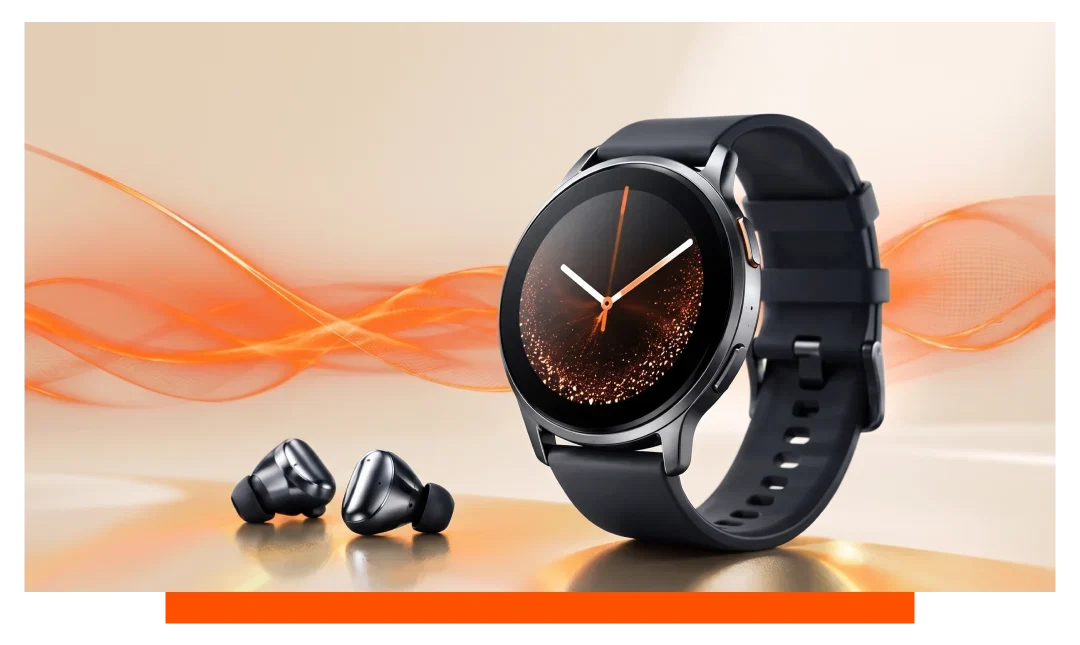
Yes - you can use Spotify offline on Samsung Galaxy Watch models, including the Galaxy Watch 8 and Watch 8 Classic. You need a Spotify Premium account and the Spotify app on the watch. Download playlists, albums, or podcasts over Wi-Fi, then listen later without your phone or a data connection.
What offline Spotify means on Galaxy Watch
Offline playback stores audio files on the watch so music plays with no network. The Galaxy Watch 8 series has ample storage, so space is rarely a barrier for a few big playlists. Expect smoother battery life than streaming, because the radio stays idle.
Compatibility and prerequisites
Spotify offline on Wear OS requires Premium for downloads. Free users can stream with ads on Wi-Fi or LTE, but cannot download to the watch. Both Bluetooth and LTE versions of the Galaxy Watch 8 support offline if you install the Spotify app.
Core requirements checklist
- Spotify Premium account
- Latest Spotify app
- Wi-Fi connection once
- Battery above 20 percent
- Enough free storage
How to download Spotify playlists to Samsung watch?
Install and sign in
On your Galaxy Watch 8 or Watch 8 Classic, open the Play Store and install Spotify. Launch Spotify, then sign in with your Premium account using the phone prompt or a code. Confirm the watch shows Your Library with Playlists and Albums.
Prepare your library
Make or curate playlists on your phone first, since playlist editing on the watch is limited. To grab single tracks, add them to a dedicated playlist such as Offline Mix. Keep playlist names short for easier selection on the watch.
Download on the watch
Open Spotify on the watch, go to Your Library, then pick a playlist, album, or podcast. Tap Download to Watch, and keep the watch on charger or within Wi-Fi range until it completes. A green arrow appears when downloads finish, and a progress ring shows partial completion.
Choose download quality
In Spotify settings on the watch, set Download Quality to Normal or High. Normal is roughly 96 kbps, while High is roughly 160 kbps, balancing size and sound. Higher quality uses more storage and takes longer to download.
Does Spotify work without phone on Galaxy Watch?
Yes, in two ways: offline and on-watch streaming. Offline works on both Bluetooth-only and LTE variants after you download content. Streaming without a phone works on LTE models anywhere with network, and on Wi-Fi models when connected to Wi-Fi.
Free versus Premium on the watch
Premium enables downloads, on-demand album playback, and no ads. Free allows shuffle streaming, limited skips, and ads when the watch has Wi-Fi or LTE. Both tiers can control phone playback through Spotify Connect when your phone is nearby.
Offline vs streaming - at a glance
| Mode | Connection needed | Battery impact | Data per hour | Audio quality | Free tier | Premium |
|---|---|---|---|---|---|---|
| Offline playback | No | Low to moderate | 0 MB | 96 to 160 kbps | No | Yes |
| Wi-Fi streaming | Wi-Fi | Moderate | ~40 to 72 MB | 96 to 160 kbps | Yes, shuffle | Yes |
| LTE streaming | LTE | Higher | ~40 to 72 MB | 96 to 160 kbps | Yes, shuffle | Yes |
Storage, audio quality, and capacity planning
How many songs fit?
The Galaxy Watch 8 series typically offers 32 GB storage, with around 20 GB free after system files and apps. At High quality about 160 kbps, music uses roughly 72 MB per hour, or about 3.6 MB per 3-minute track. With 10 GB free for music, you can store roughly 2,700 to 3,000 typical tracks.
Manage downloads efficiently
Favor playlists over massive Liked Songs to control size. Mix one High quality running mix with Normal quality long podcasts to stretch space. Remove old playlists periodically to reclaim a few gigabytes quickly.
Set up listening gear and controls
Pair Bluetooth earbuds
On your Galaxy Watch 8, go to Settings - Connections - Bluetooth and pair your earbuds. Samsung and third-party earbuds with AAC or SBC work reliably. Keep buds charged to avoid Bluetooth dropouts mid-run.
Playback controls and workouts
Use the hardware bezel on the Watch 8 Classic for quick scrolling and track changes. Workout tiles let you start runs while Spotify keeps your tempo steady. Offline playback means GPS logging continues even in low-signal parks.
Troubleshooting offline playback
Common fixes
If downloads stall, keep the watch on charger, connect to 2.4 GHz Wi-Fi, and reopen Spotify. If tracks will not play offline, toggle Offline Mode in Spotify settings and restart the watch. Reinstalling Spotify refreshes permissions that sometimes block storage access.
Quick checks
- Premium still active
- Enough free space
- App fully updated
- Wi-Fi not captive
- Reboot the watch
Galaxy Watch 8 specifics to note
LTE versus Bluetooth models
Both models support offline exactly the same. LTE adds independent streaming on runs when you forget your phone. Battery drains faster on LTE streaming than on offline playback, often by 10 to 20 percent per hour difference.
Firmware and app updates
Wear OS and One UI Watch updates can improve Wi-Fi stability and Bluetooth performance. Spotify updates may tweak download reliability and quality options. Check for updates monthly to maintain consistent offline performance.
Tips for runners and gym sessions
Build a reliable offline routine
Schedule downloads the night before to bypass morning network congestion. Keep a 60 to 90 minute High quality playlist for intense sessions. Add a 3 to 4 hour Normal quality playlist for long weekend runs.
Comfort and accessories
Secure the watch with breathable Samsung straps for sweat-heavy workouts. Top up easily and carry spare buds with curated Samsung accessories. A snug fit improves heart rate accuracy during intervals.
Frequently asked questions
Can I download single songs to the watch?
You cannot tap a single track and download it directly on the watch. Add the track to a playlist on your phone, then download that playlist on the watch. This mirrors Spotify's wearable workflow across Wear OS.
Will offline downloads expire?
Spotify may require the watch to reconnect periodically to verify your Premium status. Open Spotify online at least once every 30 days to keep downloads active. The check is quick and runs in the background.
Can Free users listen offline?
No, offline listening requires Premium on the watch. Free users can stream in shuffle mode with ads on Wi-Fi or LTE. You can still use the watch to control your phone's Spotify.
Do podcasts download for offline playback?
Yes, podcasts download and play offline on the watch. Episodes are larger than songs because of longer duration. Delete played episodes to save space.
What audio codecs and quality are available?
On Wear OS, Spotify typically uses Ogg Vorbis at Normal or High settings. Expect roughly 96 to 160 kbps depending on your selection. High gives clearer cymbals and vocals at a modest size increase.
How many devices can I download to?
Spotify Premium allows downloads on up to 5 devices per account. Each device can hold up to 10,000 downloaded tracks. The watch counts as one device in this quota.
Does the watch need LTE for offline?
No, LTE is not required for offline playback. LTE helps only for streaming and library browsing away from Wi-Fi. Bluetooth-only models work perfectly offline after downloads.
Conclusion
Yes - you can use Spotify offline on Galaxy Watch, including the Samsung Galaxy Watch 8 and Watch 8 Classic. With Spotify Premium, download playlists, albums, and podcasts over Wi-Fi, then enjoy phone-free music anywhere. Set quality wisely, manage storage, and your watch becomes a reliable, independent music companion.


Leave a comment
All comments are moderated before being published.
This site is protected by hCaptcha and the hCaptcha Privacy Policy and Terms of Service apply.