


How to Choose the Right Apple Watch Strap Size: A UK Guide
The Apple Watch comes in various generations and sizes. Which Apple Watch straps fit your Apple Watch? In this blog, we’ll explain in 4 simple steps how to determine the right size Apple Watch strap for you.
How Do I Order the Right Size Apple Watch Strap?
When buying a new Apple Watch strap, it’s crucial that it fits your Apple Watch perfectly. Fortunately, every Apple Watch strap fits any Apple Watch, regardless of its age, as long as you choose the correct size. Our simple step-by-step guide helps you determine the exact Apple Watch strap you need.
Step 1: Identify Your Apple Watch Model
You can easily check your Apple Watch model, as it’s engraved on the back of the watch. This shows which generation you have and the case size. The size is indicated in millimetres, such as 40mm or 45mm.

Apple Watches are always made in two sizes, a smaller and a larger one. These sizes have evolved over the years. Here’s an overview of the small and large sizes:
- Small sizes: 38mm, 40mm, 41mm and 42mm
- Large sizes: 44mm, 45mm, 46mm, and 49mm
Check the back of your Apple Watch carefully to confirm its size.
Complete overview of Apple Watch sizes :
| Apple Watch case size | Compatible strap sizes | Which Apple Watches are suitable? |
| 38mm | 38, 40, 41 & 42mm* | Apple Watch Series 1, 2, 3 (small sizes) |
| 40mm | 38, 40, 41 & 42mm* | Apple Watch Series 4, 5, 6, SE (small sizes) |
| 41mm | 38, 40, 41 & 42mm* | Apple Watch Series 7, 8, 9 (small sizes) |
| 42mm | 38, 40, 41 & 42mm* | Apple Watch Series 10, 11, 12 (small sizes) |
| 44mm | 44, 45, 46, 49mm | Apple Watch Series 4, 5, 6, SE (large sizes) |
| 45mm | 44, 45, 46, 49mm | Apple Watch Series 7, 8, 9 (large sizes) |
| 46mm | 44, 45, 46, 49mm | Apple Watch Series 10, 11, 12 (large sizes) |
| 49mm | 44, 45, 46, 49mm | Apple Watch Ultra models (1 t/m 4) |
*Please note that the Series 1 - 42mm is a large size. Due to availability, we have placed the 42mm under the small size. This is compatible from Series 10 onwards.
Step 2: Which Strap Fits My Apple Watch?
Now that you know your size, you can determine the right strap. On our Apple Watch straps page, you can easily see which size to order. If your Watch back says 40mm, choose the strap size for 38mm, 40mm, and 41mm. This strap fits all small models.

You can select from different sizes on our website.
Despite the various sizes, all Apple Watch straps fit every Apple Watch, as long as you pair a large watch with a large strap and vice versa. For example, a 44mm strap also fits the Apple Watch Ultra, which has a 49mm case.
Now that you know which size strap fits your Apple Watch, it’s important to determine which size fits comfortably around your wrist.
Step 3: Measure Your Wrist for an Apple Watch Strap
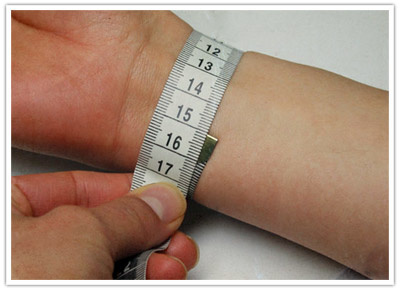
To order the right size Apple Watch strap, it’s essential to measure your wrist circumference. You can do this easily with a tape measure or a piece of string and a ruler. Measure where you plan to wear your Apple Watch.
Don’t have a tape measure? You can use a piece of string and a ruler instead. Wrap the string around your wrist, mark where it meets, and measure it with a ruler to get your wrist size.
Step 4: Find the Right Apple Watch Strap for You
Now that you’ve gathered all the information, you can choose a strap. Some straps come in different sizes, so it’s important to check your wrist size to select the right one. For example, the standard silicone strap for the Apple Watch offers S/M or M/L options. The S/M strap fits a wrist circumference of 130-190mm, while M/L fits 160-210mm.
Not all straps have sizes like S/M or M/L. A Milanese strap features a magnetic closure, allowing you to adjust the length easily. For these straps, you only need to choose the correct case size. A stainless steel mesh strap can be adjusted by removing links.
Typically, you can find the strap size in the product description, even if it’s available in only one size, like a stainless steel or Milanese strap. Unsure if an Apple Watch strap will fit? You can always contact our customer service for assistance!
Changing an Apple Watch Strap
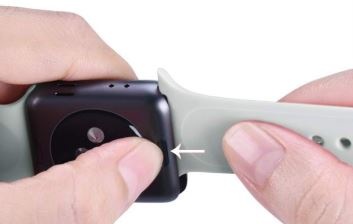
Changing an Apple Watch strap is very easy. You press the button, slide the old strap out, and click the new one in.
Conclusion
Figuring out the right size Apple Watch strap isn’t difficult. First, determine your watch size, then measure your wrist. With our Apple Watch straps, you can easily pick one that suits your style. Check out our blog 'How to change the Apple Watch strap', including a clear video.
Frequently Asked Questions
What size is my Apple Watch?
You can check the size on the back of your Apple Watch, indicated in millimetres, such as 40mm.Where can I buy an Apple Watch strap?
At Smartwatch-straps.co.uk, you’ll find a large assortment best Apple Watch straps.
Which straps fit the Apple Watch SE?
The Watch SE comes in 2 sizes, namely 40mm and 44mm. If you have a smaller 40mm model, you need watch bands in the size 38-40-41-42mm, and if you have the larger variant, you must choose the size 44-45-46-49mm.
How do you know which size Apple Watch strap to get?
First, it is important to know which size to order that is suitable for your case size, for example 40mm or 44mm. Once you know this, you can also check your wrist circumference to purchase the best-fitting band.
Do all straps fit the Apple Watch?
No, because there are two different sizes in virtually every Apple Series, you cannot interchange all straps. For the smaller watch cases, you need the size 38-40-41mm (or the 42mm starting from Series 10); for the larger sizes, you need 44, 45, 46mm, or 49mm watch straps.



Leave a comment
All comments are moderated before being published.
This site is protected by hCaptcha and the hCaptcha Privacy Policy and Terms of Service apply.