


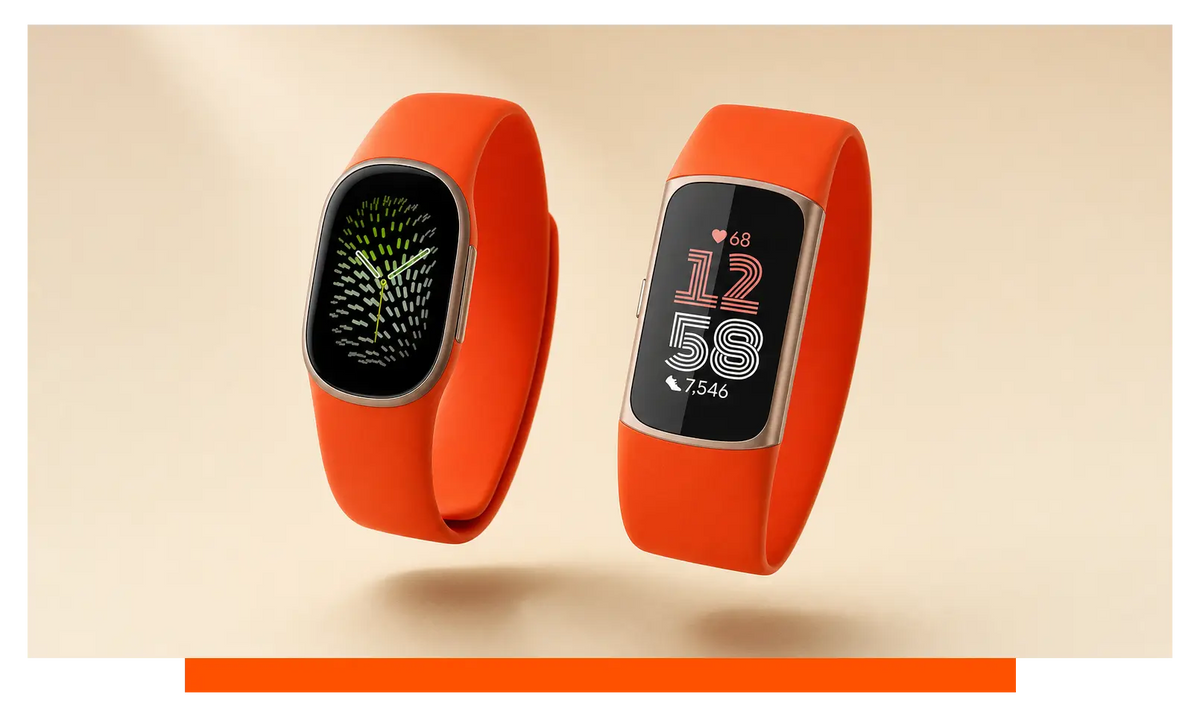
Fitbit Edge is worth upgrading to if you want a more readable, repairable tracker for training and everyday wear; Fitbit Charge 6 remains the better fit for anyone who leaves their phone behind and pays from the wrist. The deciding factor is simple: whether Google Wallet is part of your phone-free routine.
On this page
Use these links to compare the differences that will matter on your wrist.
- The short version
- Fitbit Edge and Fitbit Charge 6 specifications compared
- Should I keep Fitbit Charge 6 for wrist payments?
- Fitbit Edge vs Fitbit Charge 6: display
- Fitbit Edge vs Fitbit Charge 6: battery life and charging
- Elevation and hill tracking
- Fit, comfort and straps
- Health and exercise tracking
- Fitbit Edge vs Fitbit Charge 6: GPS
- Buttons, phones and everyday controls
- Water resistance
- Price and upgrade value
- Where Fitbit Edge is better
- Where Fitbit Charge 6 is better
- Who should choose which
- Frequently asked questions
The short version
Fitbit Edge brings practical upgrades rather than merely putting the familiar Fitbit formula into a different case.
- Choose Fitbit Edge for readability: its 1.34in / 34mm AMOLED colour display gives your workout data more room than the 1.04-inch display on Fitbit Charge 6.
- Keep Fitbit Charge 6 for phone-free payments: it supports Google Wallet, whereas Fitbit Edge does not offer mobile payments.
- Fitbit Edge is the more repair-minded choice: battery replacement is supported, which matters if your present tracker is already losing endurance.
- Hill training favours Fitbit Edge: it supports elevation tracking; Fitbit Charge 6 does not.
- Battery endurance is not the reason to switch: both are rated for up to 7 days, although Fitbit Edge takes about 90 minutes to charge and Fitbit Charge 6 takes two hours.
- Fitbit Charge 6 costs less: Fitbit Edge was listed at £159.99, while Fitbit Charge 6 was listed at £139 at the time of writing.
The central trade is Google Wallet against Fitbit Edge’s larger screen, elevation tracking and replaceable battery.
Fitbit Edge and Fitbit Charge 6 specifications compared
Fitbit Edge wins on screen space, repairability and elevation tracking, but Fitbit Charge 6 keeps the feature that can decide the whole upgrade: Google Wallet.
Device prices in this at-a-glance comparison were read at the time of writing.
| Specification | Fitbit Edge | Fitbit Charge 6 |
|---|---|---|
| Mobile payments | No | Google Wallet |
| Display size | 1.34in / 34mm | 1.04-inch |
| Battery replacement | Yes | not stated |
| Elevation tracking | Yes | No |
| Listed price | £159.99 | £139 |
| Case weight | 17.7 g without band | 15 g pebble only |
| Case thickness | 11.58 mm | 11.20 mm |
| Phone compatibility | iOS 16.4+; Android 11+ | iOS 15+; Android 9.0+ |
| GPS | Built-in GPS | Built-in GPS + GLONASS |
| Charge time | About 90 minutes | Two hours |
| Battery life | Up to 7 days | Up to 7 days |
| Display technology | AMOLED color display | AMOLED display |
| Always-on display | Yes | Yes |
| Side button | Mechanical side button | Haptic side button |
| Exercise modes | 40+ | 40+ |
| ECG app | Yes | Yes |
| Skin temperature sensor | Yes | Yes |
| SpO2 | Yes | Yes |
| Water resistance | 5 ATM, IP68 | 5 ATM |
The upgrade therefore comes down to one exchange: Fitbit Edge gives you more useful hardware for viewing and maintaining the tracker, while Fitbit Charge 6 lets you pay without reaching for your phone.
Should I keep Fitbit Charge 6 for wrist payments?
Keep Fitbit Charge 6 if Google Wallet is part of how you run, commute or exercise without carrying your phone.
This is the clearest feature that Fitbit Edge cannot replace. Charge 6 lets you make a supported contactless payment from your wrist; Edge is not among the Fitbit devices that support mobile payments. If you stop for a drink after a run or travel with little more than your tracker, that convenience can outweigh Edge’s other improvements.
The answer changes if you already carry your phone or bank card. In that case, Google Wallet becomes less important and Edge’s larger display, elevation data and replaceable battery improve things you use throughout the day rather than only at the till.
For a phone-free routine, you would notice the missing wallet feature immediately. Charge 6 is the safer choice.
Fitbit Edge vs Fitbit Charge 6: display
Fitbit Edge has the more readable display, with a 1.34in / 34mm AMOLED colour panel beside the 1.04-inch AMOLED display on Fitbit Charge 6.
That extra viewing area is useful when you are checking heart rate or progress during exercise, especially when a quick glance is all you can spare. It also gives everyday information more breathing room, so Edge is the more accommodating tracker if small text or tightly packed data bothers you.
Both devices support an always-on display. You are not choosing between immediate access and a blank screen; you are choosing how much information can be presented comfortably when the display is active. Charge 6 still suits someone who likes a narrow, understated band and only checks basic readings.
Outdoors or midway through a workout, Edge should feel easier to scan. That is one of the few upgrades you will appreciate every time you look down.
Fitbit Edge vs Fitbit Charge 6: battery life and charging
Fitbit Edge does not extend the headline battery life, but it charges faster and supports battery replacement.
Both trackers are rated for up to 7 days, so a healthy Charge 6 will not suddenly feel short-lived beside Edge. Your actual endurance will still depend on how you use the always-on display, GPS and health tracking, but there is no stated battery-life gain here to justify upgrading by itself.
Charging is more convenient on Edge. Its stated charge time is about 90 minutes, against two hours for Charge 6. That difference matters most when you realise before bed or a training session that the battery is low and want to put the tracker back on promptly.
The longer-term distinction is battery replacement. Fitbit Edge supports it, making the tracker more attractive if you want to keep the same device after its original battery has aged. No equivalent replacement claim is stated for Charge 6, so it would be wrong to assume the same serviceability.
Day to day, the endurance feels familiar. Over longer ownership, Edge’s replaceable battery is the meaningful advantage.
Elevation and hill tracking
Fitbit Edge is the better tracker for hills because it supports elevation tracking and Fitbit Charge 6 does not.
This matters if your activity goals involve elevation gain, floors climbed or repeated hill sessions. Distance and heart rate tell only part of the story when your route rises sharply; elevation gives the effort some context and makes it easier to distinguish a flat outing from a demanding climb.
If your routine consists mainly of level walks, gym sessions or flat commutes, this difference is unlikely to change your decision. The shared health and exercise tools will be more relevant, and Google Wallet may still make Charge 6 more useful.
Take either tracker onto a hilly route, however, and Edge records a part of the workout that Charge 6 misses.
Fit, comfort and straps
Fitbit Charge 6 is the lighter, slightly thinner tracker, while Fitbit Edge gives you a larger screen without moving into full smartwatch territory.
Edge weighs 17.7 g without its band and measures 11.58 mm thick. Charge 6 is listed at 15 g for the pebble alone and 11.20 mm thick. The weight descriptions are not worded identically, so they should not be treated as a laboratory-perfect comparison, but Charge 6 has the lower stated case weight and the slimmer measurement.
That gives Charge 6 an edge if you prefer the least noticeable fit for sleep tracking or all-day wear. Edge asks you to accept a little more case presence in exchange for a display that is easier to read. Neither choice is simply better: comfort depends on whether a narrow shape or a more glanceable screen solves the bigger problem for you.
The strap can change the experience as much as the case. The available Fitbit Charge 6 straps include silicone, nylon, leather, Milanese and metal options. That means you can keep the familiar tracker but move from a sweat-friendly exercise fit to something softer, smarter or more breathable.
The wider Fitbit straps range also covers silicone, nylon, leather, Milanese and metal, giving Edge buyers comparable freedom to tune the feel and appearance. Check the stated fitment before ordering rather than assuming that two Fitbit trackers share a connector.
On your wrist, Charge 6 feels like the more discreet object; Edge repays its extra presence whenever you read the screen.
Health and exercise tracking
Fitbit Edge adds useful tracking around the edges, but the core health package remains close to Fitbit Charge 6.
Both trackers offer 40+ exercise modes, an ECG app, skin-temperature sensing and SpO2. For everyday heart and wellness tracking, Charge 6 therefore remains a capable device rather than a tracker you need to replace simply to retain the important basics.
Edge earns its upgrade case through elevation tracking and on-wrist cycle tracking, not by stripping away Charge 6’s established health tools. Those additions are worthwhile when they match your routine. If they do not, the shared ECG, oxygen and temperature features make the experience much more alike than the new shape suggests.
The practical difference appears in specific situations: hill sessions and cycle tracking favour Edge, while ordinary gym and health logging will feel familiar on either tracker.
Fitbit Edge vs Fitbit Charge 6: GPS
Both trackers can record outdoor routes without borrowing your phone’s GPS, although their listed positioning support is not identical.
Fitbit Edge has built-in GPS. Fitbit Charge 6 lists built-in GPS plus GLONASS. The supplied specifications do not establish that one is consistently more accurate in every environment, so the extra named system should not be turned into a sweeping claim about route quality.
For walkers and casual runners, the important point is independence: either tracker can map an outdoor session while your phone stays at home. That is also where the payment difference becomes sharper. Charge 6 can combine phone-free route recording with Google Wallet, whereas Edge can record the route but cannot replace your wallet.
You will notice comparable freedom from carrying a phone, but only Charge 6 completes that setup with wrist payments.
Buttons, phones and everyday controls
Fitbit Edge offers the more conventional control with a mechanical side button, while Fitbit Charge 6 uses a haptic side button.
A mechanical button gives you a physical control to find and press, which can be reassuring during exercise or when your attention is elsewhere. Charge 6 keeps its cleaner, less interrupted profile through a haptic control. Preference matters here: some people value definite movement, while others prefer the more integrated feel.
Phone requirements also differ. Edge supports iPhone models running iOS 16.4 or newer and Android phones running Android 11 or newer. Charge 6 supports iOS 15 or newer and Android 9.0 or newer, so it accommodates older supported phone software.
If your handset already meets Edge’s requirements, the button is what you are more likely to notice. Edge gives you a physical press; Charge 6 keeps interaction flush with the case.
Water resistance
Both trackers are rated to 5 ATM and are suitable for swimming, while Fitbit Edge also carries an IP68 rating.
The shared water-resistance level is the important fact for pool use. Edge’s additional ingress-protection label does not create a stated advantage in swimming depth, so it should not decide the upgrade on its own.
Fitbit advises against showering with Edge because soaps, shampoos and conditioners can harm the device over time and irritate the skin. Removing a tracker in the shower also gives your wrist and band a chance to dry, which is useful if you wear it around the clock.
In the pool, either model covers the intended job. Edge’s extra rating is reassuring, not the main reason to switch.
Price and upgrade value
Fitbit Charge 6 is the lower-priced option, while Fitbit Edge asks more for its screen, elevation tracking and repairable design.
At the time of writing, Fitbit Edge was listed at £159.99 and Fitbit Charge 6 at £139. That makes Charge 6 the stronger value if you are buying fresh and want core Fitbit health tracking, built-in GPS and Google Wallet in a compact band.
Edge’s value is more personal. It makes sense if your Charge 6 battery is fading, you struggle to read its display during exercise, or your routes make elevation data useful. Replacing a healthy Charge 6 solely for familiar health features would deliver less benefit because so much of the core package is shared.
If Google Wallet matters, paying more for Edge would also remove a feature you already use. If it does not, the money buys changes you can see, track and potentially keep working for longer.
Where Fitbit Edge is better
Fitbit Edge is better when readability, climbing data and longer-term repairability matter more than wrist payments.
- Larger display: 1.34in / 34mm gives readings more room than the 1.04-inch Charge 6 screen.
- Battery replacement: supported on Edge, making it the more repair-minded long-term choice.
- Elevation tracking: included for hills, elevation gain and floors climbed.
- Faster charging: about 90 minutes rather than two hours.
- Physical control: a mechanical side button instead of a haptic side button.
- Ingress rating: 5 ATM and IP68 rather than 5 ATM alone.
Where Fitbit Charge 6 is better
Fitbit Charge 6 is better for phone-free payments, a lighter fit and compatibility with older supported phone software.
- Google Wallet: available on Charge 6 and absent from Edge.
- Lower case weight: 15 g for the pebble, beside 17.7 g for Edge without its band.
- Thinner case: 11.20 mm rather than 11.58 mm.
- Broader phone support: iOS 15+ and Android 9.0+, compared with iOS 16.4+ and Android 11+ for Edge.
- Lower listed price: £139 at the time of writing, compared with £159.99 for Edge.
- Named positioning support: built-in GPS + GLONASS rather than built-in GPS alone.
Who should choose which
Choose Fitbit Edge for a clearer, more maintainable training tracker; choose Fitbit Charge 6 when compactness, value or Google Wallet takes priority.
- Choose Fitbit Edge if you train outdoors and want the 1.34in / 34mm display to be easier to read at a glance.
- Choose Fitbit Edge if hills matter and you want elevation gain, floors climbed or hill sessions represented in your activity data.
- Choose Fitbit Edge if your present battery is fading and supported battery replacement makes longer ownership more appealing.
- Choose Fitbit Charge 6 if you leave your phone behind and use Google Wallet after a run, during a commute or on the way home from training.
- Choose Fitbit Charge 6 if you like a discreet tracker with the lower stated case weight and thinner body.
- Choose Fitbit Charge 6 if value matters most and its shared health features already cover your needs.
If you are considering a different Fitbit shape as well, our guide to the best Fitbit for men: Fitbit Charge, Versa or Inspire? explains how the main styles suit different wrists and routines.
In the end, Edge is a worthwhile hardware upgrade only when its clearer screen, elevation tracking and replaceable battery beat the one convenience Charge 6 uniquely keeps: paying from your wrist.
Frequently asked questions
These answers cover the related setup and buying questions that may affect your choice.
Do I need a premium membership to use the important Fitbit Edge health features?
No. Everyday heart rate, sleep, SpO2, skin-temperature variation, activity, ECG and Irregular Rhythm Notifications work without Google Health Premium; the membership is for advanced health tracking and personalised coaching, including blood-pressure and insulin-resistance trends.
Can Fitbit Edge and Fitbit Air be used together on the same account?
No. The Google Health app supports a single Fitbit device or Pixel Watch at a time; the sole multi-device exception is pairing Fitbit Air with one Pixel Watch.
Can Fitbit Edge control music from every phone app?
Yes, when the media is playing through a Bluetooth-connected player on your phone. Edge can control playback and volume for music, podcasts and video.
Is Fitbit Edge a better buy than a Pixel Watch for runners?
Not if deeper running guidance is your priority: Pixel Watch 5 adds running-form analysis, custom workouts, real-time guidance and dual-frequency GPS. Edge better suits runners who prefer a slim tracker and up to 7 days of battery life.


Leave a comment
All comments are moderated before being published.
This site is protected by hCaptcha and the hCaptcha Privacy Policy and Terms of Service apply.